Violet Rollergirl’s Website Colophon
col·o·phon
1: an inscription at the end of a book or manuscript usually with facts about its production
2: an identifying mark used by a printer or a publisher
I’m pretty proud of my Web site. Sometimes, other providers ask me how I made this site. Some clients have, too.
There are some novel things about it that I’d like to highlight, like my unique mad-lib style booking form, cryptocurrency payment integrations, and deep-linkable anchors.
So here’s a bit of technical information regarding how it all works. But, first…shall we play a game?
On this page
- Easter eggs
- Technology stack
- Permalinks for intra-page UI elements
- Client-side booking form
- Cryptocurrency tips and donation links
- Subscribable tours calendar
Easter eggs
One thing I love about technology, especially information technology, is that it turns words into spellcraft. Think of me as a modern day witch: by inscribing my desires into electricity and stone, I am invoking my desires into the world and literally crafting spells to bring you to me.
In that spirit, I’ve sprinkled numerous easter eggs for you to find around my site.
Some of them are just for fun and amusement. Others will actually earn you discounts when booking, if you’re clever enough to discover them, so it behooves you to read closely and explore boldly.
Sometimes, they’ll be marked with this sequence: , encouraging you to look more closely. Other times they’ll simply be described as such textually. And sometimes, they’ll be hidden somewhere in the site itself, where you’ll need to 🤭 go deeper to decode them.
Happy hunting. ;)
Technology stack
My site is built on a very heavily customized rendition of a Jekyll template intended for a photography portfolio that I modified myself. The original template provided the gallery view, the panel switching behavior, and the color scheme. I added all other elements and features.
No server required
Jekyll is a popular static site generator written in the Ruby programming language. There are many such static site generators, but I am most familiar with Jekyll. It uses a free templating language called Liquid (originally developed by Shopify) to provide basic build-time logic and coalesce static HTML, CSS, and JavaScript page assets from individual reusable snippets.
Since my site is entirely static (c.f., dynamic, such as with a WordPress, Squarespace, Wix, or other site technology whose templates are not pre-rendered), I require no server-side compute cycles to publish it. All I require is an Internet address (i.e., a domain name registration and an associated IP address) and a Web (HTTP) server. This makes my site easy for me to migrate from one server to another when I need to or if, like most sex workers, I am eventually banned from one platform or another. This also makes it relatively inexpensive to host.
This characteristic also forms the basis of some of the more novel and security-aware features I’m most proud of.
Onion location hint
Thanks to the ultimate simplicity of its implementation, my site exists simultaneously as a regular “clearnet” Web site and as a darknet “Onion site” accessible only to users of the Tor network. I encourage everyone, but especially clients seeking maximum discretion, to use that version of my website.
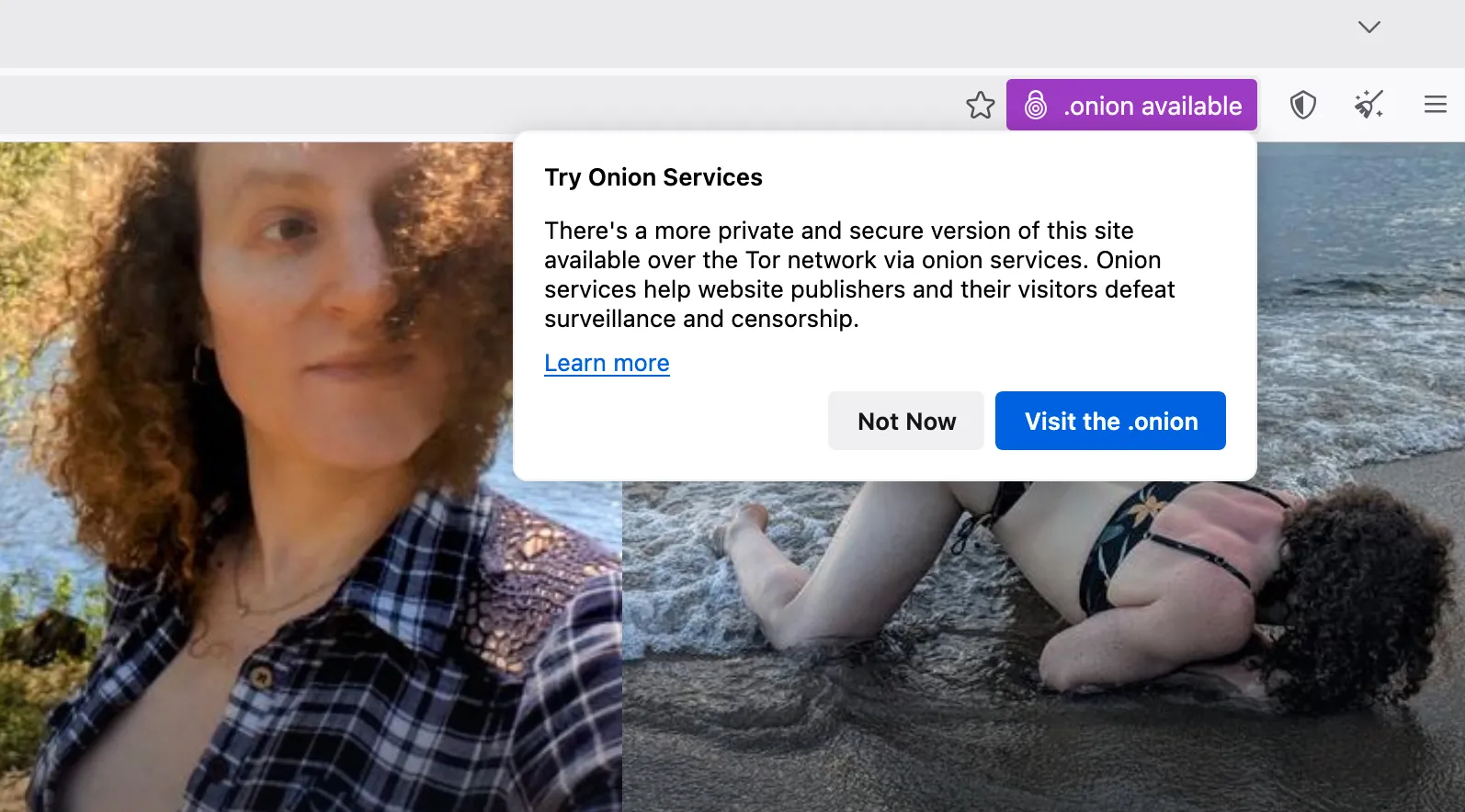
I proactively inform visitors who are using the special Tor Browser of the availability of my Onion site via an Onion location hint in the <head> element on every page of my site. It looks something like this:
<meta http-equiv="onion-location"
      content="http://7leifmsll6syh3fdnx2wlyfg6e7hfvi4xt2l5hafovtm4gqtqosudbyd.onion/colophon/"
/>
In supporting browsers, such as some versions of Tor Browser, this creates a non-intrusive popup that visitors will see the first time they load a page on my clearnet site. The hint looks like this:
Local full-text search
As my site has grown to include many resources and I’ve found myself writing more and more, I decided that I needed some kind of search functionality.
My site’s search page provides a keyword search powered by Lunr.js. This is also provided in my customized 404 Not Found page to try helping someone who may have lost their way.
Permalinks for intra-page UI elements
As my site clearly showcases, I’m very detail-oriented. That means this site contains a lot of information about me and my offerings.
Some pages are long. In order to make everything as easy to find as possible, I’ve ensured each element can be referenced with a fragment identifier by including an id attribute to the appropriate HTML element.
Each individually ID’ed element therefore also functions like a permalink and, when accessed, CSS rules :targeting that element create a halo effect around it, highlighting it visually. Try it out:
- read my incall availability
- book a curiosity call
- view my Signal contact link
Note how the heading or page area glows in response.
Client-side booking form
My site’s Contact page includes a booking form that has some especially unique properties.
Mad-lib style form prose
My booking form is written from the perspective of a client’s message to me in a “mad-lib style” block quotation with input fields embedded in the prose, rather than being presented as a traditional data entry task. The prose mimics an ideal client inquiry.
My intention in presenting my booking form this way was to help clients learn what a model inquiry reads like by literally writing such an inquiry and simply requiring them to fill in the blanks.
Hey, a girl can dream.
Integrated booking guide
I’ve also written a thorough booking guide, which details the entire process for booking me. The form itself is integrated deeply with its guide.
Atop each field in the form are small information icons (ⓘ) that link directly to a thorough reference for that specific form field’s purpose. When someone clicks on a field’s information icon, they’re taken directly to the part of the booking guide that provides guidance for what to enter in that specific field.
Following each field’s description in the guide is a “Continue in Form” button, which takes them back to the form field in question.
Fill while browsing
You can partially fill in my booking form, then browse to another page on my site, then come back to the form again, all without being forced to start filling the form in from scratch every time.
When you enter data into one of the fields in my booking form, my website will remember this entry and automatically fill it back in for you when you return to the form.
For privacy’s sake, this memory persists in sessionStorage. This means it is remembered only for as long as the browser tab or window in which my site is opened stays open.
When you explicitly close that tab or window, the information in the form is deleted.
Fill from links
My Rates page and my booking form work together.
Clicking on any of the “Reserve now” links from my fee schedule will automatically fill in the appropriate data in the correct field in my booking form.
For example, clicking the 2-hour GFE session menu item’s booking link automatically fills in the value of 2 in the date duration field on my form, along with the GFE services selection for the service type.
Go ahead. Try it. :)
Data type-specific inputs
Where relevant, my form uses specific form input element attribute types to more precisely shape the suggestions for what to enter into the specific field. These include the HTML5 input types of:
tel, when I solicit a telephone number for screeningdatetime-local, when I ask on what specific date and time a client wants to booknumber, when I ask how long a session should be
This makes it easier to enter requested information using built-in Web browser user interface elements.
Data entry validation
HTML5 client-side form validation attributes ensure the form data is at least somewhat sensible before it is sent to me.
For example, the form will not allow itself to be submited unless a client enters data in required fields, ensuring no necessary information is omitted.
These checks are handled natively, by the Web browser, and visitors get visual and textual feedback about the validity state for each field and the form as a whole.
Individual fields change color when they move from an invalid to a valid state. The submission button changes text from “Check fields” to “Send inquiry” when the form is fully validated. In supporting browsers, pressing the “Check fields” button highlights the first invalid field and presents an informational tooltip describing how to fix the problem.
Privacy guarantees of first contact
Most uniquely, my booking form does not use a third-party service to send me emails when a client “submits” the form.
Yes, that brings up a few questions. One biggie is, “why?” The second is probably, “how?”
Why my booking form doesn’t use a third-party service
To answer the first question, it’s because I designed my booking form with the privacy of my clients and the protection of our correspondence as its top priority.
Since a client’s first inquiry can contain sensitive details such as screening or verification information, every additional entity (person, service provider, third-party, whatever) who’s privy to our correspondence represents an added risk. Minimizing this number is an effective way to reduce that risk. For obvious reasons, this business requires a commitment to discretion, so it’s critical that my correspondence with potential clients remain absolutely confidential and secure.
Moreover, the one purpose of a booking form is to shape an introductory message and put it in a high-priority inbox so that clients are more likely to get a reply from me. That’s something your phone or computer can already do on its own.
How my booking form avoids needing a third-party service
Most booking forms transmit the information typed into them to a remote server, which then relays that same data onwards to the form’s addressee. Mine doesn’t. Instead, it simply composes a message for you, and opens your chosen messaging app so you can send the pre-written message yourself.
This way, there’s no additional relay service. It’s just you and me, the way discreet messaging is supposed to be.
My booking form accomplishes this using technology older than Web forms: standardized URI schemes.
I did it this way because I can safely assume your phone or computer already has the messaging app you want to use, such as Signal Private Messenger, WhatsApp, an email client (like GMail or ProtonMail), or an SMS/text messaging application. Every phone has at least one of these already installed in it (that’s what phones are for) so every phone is already all but guaranteed to be technically capable of sending me a message. All the booking form has to do is format the text.
For example, say a client prefers communicating via email so they choose the “email” option at that point in the form. When they do this, the form’s submit button now becomes a button that launches their phone or computer’s built-in email app or (web)mail client. The email app or mail client already knows how to handle being told to write a new message, and so a new email with templated, pre-drafted body text is automatically composed. All that’s needed now is to attach screening documents to the email and press the “Send” button.
Likewise, should a client express that they prefer communicating via WhatsApp, my form’s submit button changes to make use of WhatsApp’s automated message composition feature. Just as with email, a precomposed message appears on their phone. That message is already addressed to my WhatsApp number. They now merely need to attach their screening documents, and then press the “Send” button.
Most communication apps have this templating capability. An exception is Signal, which is why my form also has a “Copy Inquiry to Clipboard” button. That button does what it says on the tin: it puts the templated message into the user’s clipboard, ready to be pasted into whatever text field they like, such as a Signal Private Messenger message.
More technically, all of this works by having a bit of JavaScript swap out the form’s submit event with a click action on another link in the page whose URL href attribute value is modified as the form is being filled out. Links whose destination is an SMS (text message) use the sms: scheme. Emails use the mailto: scheme. Jabber/XMPP instant messages use the xmpp: scheme. Signal and WhatsApp messages are registered to fully-qualified URLs at signal.me and wa.me, respectively, and will ordinarily be handled by the URL protocol handlers registered with the browser or Operating System upon installation of that app.
This process circumvents every other middle man. My web host never receives the data entered in the form (the form merely composes some text), nor does any other service like Google Forms, TypeForm, Jot Form, and so on. Such third and even fourth parties are often used by booking forms across the industry. To be clear, none of those form submission services actually provide the level of privacy that some of them claim to.
Hell, I’d be happy to prove this claim to you in person, perhaps while in my panties, if that thought appeals. ;)
I believe the boon to privacy I gain by using this technique outweighs the disadvantage of possible user confusion: by directly invoking a locally installed app instead of submitting data to a remote third-party service, I’m able to actually provide prospective clientele exactly as much privacy as their chosen communication method implements because only their chosen communication method is party to their messages.
Of course, it takes two to tango. If someone chooses to send an insecure SMS/text message instead of a Signal Private Messenger message, the privacy of our correspondence will be subpar. But at least my actions are not the ones forcing us to downgrade our security, and I can still take inquiries via the method that specific prospect prefers.
Other benefits of avoiding a third-party service
Confidentiality and discretion was my driving motivation for designing a booking form this way. However, there are other benefits as well.
- Response assurance: as inquiries are always sent from the client’s app directly, there isn’t any opportunity for them to accidentally mistype their return address, ensuring delivered messages are always ones I can reply to, should I choose to.
- Block by sender: since clients send messages directly, it is possible to block specific, individual inquirers from reaching you, the same way you do with any other messaging channel. (This either isn’t possible or becomes complex and brittle when using most form services.)
- Cost savings: obviating the need for a third-party service means I don’t spend any money to power my form, making this an additional way I keep booking costs lower than they would be otherwise.
- Future proofing: forms relying on a third-party service stop working when that service ships breaking changes or goes out of business, while my form will always work for as long as Web browsers support opening other apps.
Steal my booking form code
I don’t mean to denigrate other providers in comparing my booking form to theirs. Rather, my intent is to share my methods here in the hope that other providers implement these techniques for themselves. If more do so, we can collectively raise the standard of privacy protections offered to the clientele in our industry more broadly.
If you are an implementer, please find further documentation and a minimal working example of my booking form code.
Sex, pleasure, and companionship is a team sport. It’s clear that when we protect the communication with our clients, we protect ourselves. When our clients protect us, they are also protecting themselves, too.
Please feel free to try my form out and experience how it works for yourself. If you do, I just ask that you please also let me know it’s just a test, and not a real inquiry when you actually send me a message so I know you’re simply enjoying trying out this tech. Unless…. <3
Cryptocurrency tips and donation links
In keeping with my commitment to privacy, on my links page is a section listing options for tipping me using privacy-preserving digital money known as Zcash and Monero. For both of our safety and discretion, I strongly prefer cryptocurrency over fiat payments and have devoted significant time to helping you learn to use crypto if doing so is something you haven’t done before.
The “z” in Zcash stands for “zero knowledge,” which is a branch of cryptography that makes it possible to assert mathematical proofs without having full visibility into the arguments of the proof itself. Practically, this makes it possible to devise electronic payment systems that share some of the beneficial properties of cryptocurrency systems like Bitcoin but without being subjected to its most undesirable requirement of one’s financial transactions being fully publicly published on its transparent ledger for all the world to see.
Put another way: Zcash (and other effective “privacy coins” like Monero) are to money what Signal Private Messenger is to speech.
I also accept deposits and full payment in these privacy-preserving cryptocurrencies, which means it is possible to engage my services in a way that provably leaves absolutely no public (unencrypted) data trail that my services were ever engaged by you. By making myself available for contact through Signal Private Messenger via my booking form and for payment via Zcash, there is no point in any of my remote interactions with a client that any digital third party or eavesdropper might be able to snoop on or learn about our interactions.
I reuse the same technique of registering URL protocol handlers that my booking form uses for these cryptocurrency donation options. Both Zcash and Monero have standardized URL schemes for invoking various intended actions through links, and I have implemented those on my site. These are specifically the zcash: scheme described by the Zcash Improvement Proposal (ZIP) 321, and the monero: scheme described by the Monero Project’s TX Scheme paper.
I further provide QR codes that encode the same URI data into an image for easy access by wallet apps like Zodl or Cake Wallet that provide QR code scan functionality. You can click or scan the QR codes of my donation links on my site to send me Zcash or Monero denominated cryptocurrency conveniently as a tip, gift, donation, deposit, or full payment at any time. While I also accept Bitcoin and Ethereum, I do not prefer them as transactions on those ledgers are published publicly and with full payment details to the world, making them subpar options for private payments outside of personal correspondence.
Subscribable tours calendar
My handy travel calendar always shows you the most up-to-date information about my whereabouts and my availability. This information is repeated in numerous parts throughout my website, including a horizontally scrollable marquee in the menu bar at the bottom of my website’s desktop view and the main navigation menu panel when in mobile view.
I made it to answer some of the most frequent questions I get, like “where are you” (look at my calendar), “are you available” (look at my calendar), “when will you be in [some city]” (look at my calendar), and so on.
The subscribable part of this calendar is deceptively simple: it is just a dedicated Google Calendar. However, as the Google Calendar software and service is based on the standard iCalendar specification, it can be used to describe more than just tour listings.
Indeed, my personal workflow uses this calendar’s data as one part of a fully fledged, private availability and appointment scheduling system that publicly discloses information merely at day-level time and city-level location granularity for obvious discretionary and personal safety reasons.
On the calendar visible to the public:
- An event’s
LOCATIONproperty publicly discloses a tour destination.- When no
LOCATIONis present, my website displays the text “(Undisclosed).”
- When no
- An event’s
SUMMARYproperty describes a tour succinctly.- Since every event must have a
SUMMARY, I usually duplicate theLOCATION’s value when one is missing.
- Since every event must have a
- An event’s
TRANSP(“time transparency”) property describes whether an appointment can be booked on a given day.- Events that have no
LOCATIONbut do have aSUMMARYusually also correspond to a blocked-off time period when I cannot be booked, such as an exclusive arrangement as part of FMTY/TMTY or other types of extended dates. - Technically, blocked dates are those events whose
TRANSPproperty have theOPAQUEvalue while bookable dates are marked with theTRANSPARENTvalue.
- Events that have no
- An event’s
DESCRIPTIONproperty provides additional relevant details when appropriate, which can include:- Neighborhood-level location granularity, if relevant.
- Special offer or discount deals related to the event.
- A note about why I’m in the area, like a pointer to a related event relevant to my work as a provider.
- An event’s
VALARMcomponent provides optional notifications ahead of the tour’s commencement.- You won’t notice these unless you actually subscribe to my calendar in your iCalendar-supporting calendar app.
- You can silence these in most apps when subscribing if you don’t want notifications of when I’m in a new city.
My website displays this information in a number of different ways, but all of this is available to you in whatever calendaring application you prefer to use via subscription buttons at the bottom of my Tours page.