
Violet Rollergirl’s Guide to Booking an Escort Completely Secretly
Reports of my death are greatly exaggerated.
—Privacy herself
It’s never been easier for two people to learn about each other, communicate with one another, and send money to one another, all without anyone else ever being aware they’ve done this. That has some absolutely wild, even revolutionary implications.
For our purposes, it means that if you’re looking to book an escort and want to do so without anyone on the Internet knowing you did that (except the companion you’re going to meet, of course), you need to do it the way I show you in this guide. ¡Viva la Revolución!
In this article
- Your digital toolkit for ultimate discretion
- Use Tor Browser to visit only reputable escort malls and ad sites
- Use Signal Private Messenger to contact the companion you chose
- Use shielded Zcash to pay your deposit
- Have questions? I’m here for you!
Your digital toolkit for ultimate discretion
It’s dangerous to go alone. Take this:
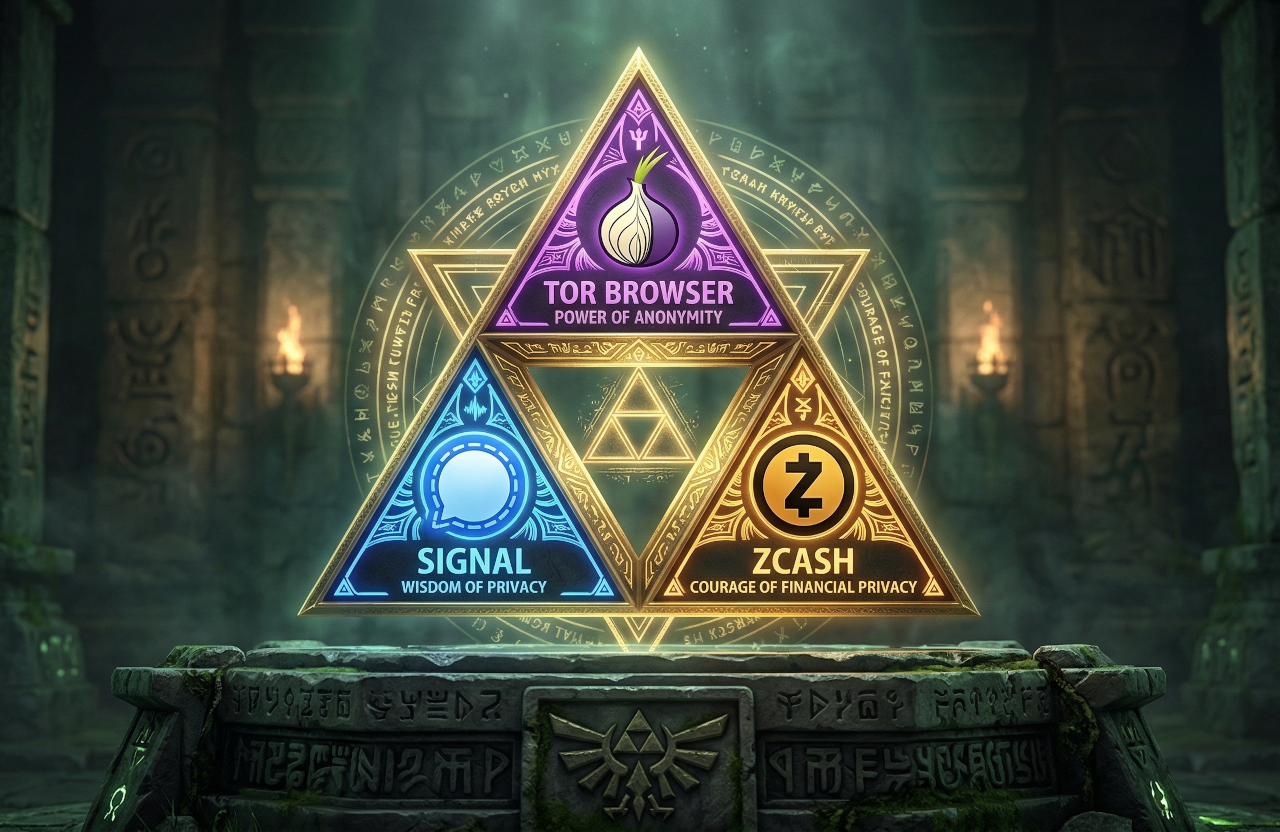
(Yes, I’m a nerd for Zelda. And triangles.)
Booking an escort is like contracting the services of other similar professionals. Very simply, the process looks like this:
- Find the professional you want to book.
- Get in touch with that professional to request a quote for the service you want.
- Pay a deposit and ultimately your total amount due.
In the physical world, you might find a service provider by walking around on the street or in a mall. Storefronts with big signs like “Joe’s Famous Pizza,” “Keys Cut In One Hour,” or “Best Dry Cleaning” tell you what the provider offers. This is the analog equivalent of Web browsing.
Eventually, you need to confirm an appointment. This requires talking to a receptionist, clerk, or sales associate. When you’re not physically in a store, you use a messaging application or perhaps a Web form to start that conversation.
Finally, you have to pay them. Paying with cash is easy if you’re physically able to hand someone the money, but it won’t work if you need to put down a deposit for a reservation before you arrive. That requires electronic money.
All of these steps have encrypted, private, digital counterparts. To ensure that the Internet has absolutely no trace of your interaction with the worker you’re seeing, all you have to do is use the right digital privacy tool at the right part of the above process.
All of these are important to have installed before you need to use them so, in the next sections, I’ll explain each one and show you how to install them. Don’t worry, they are all regular apps and there are only three of them.
Tor Browser: Safe, anonymous Web browsing
Many escorts, like me, advertise on specialty Web sites, called escort malls. The analogy is obvious! Browsing an escort site is the online equivalent of window shopping.
You probably know that when you browse the Internet with a normal Web browser, most of your browsing activity is being tracked. Even if you switch your browser into a “private browsing” or “incognito” mode, your Internet service provider (your “ISP,” like Verizon, Comcast, Rogers, Telstra, iiNet, or whoever) knows what sites you, specifically, are choosing to visit.
The safest way to browse the Web anonymously is to use Tor Browser, a specialty Web browser made for one purpose and one purpose only: shielding everything you do on the Web from prying eyes. Tor Browser is free, easy to use, and available on desktop, Android, and Apple iOS devices.
Basically, Tor Browser gives everyone who uses it the same non-descript disguise. As long as you don’t voluntarily divulge personal details to a Web site you visit, no one knows that you (as opposed to any other similarly-disguised, non-descript Tor Browser user) are the one walking around the mall.
When you browse a website with Tor Browser:
- Your ISP only knows you’re using Tor, not which site you’re actually browsing.
- For extreme levels of privacy, you can connect to Tor via a Tor bridge to hide the fact that you are even using Tor in the first place.
- When you’re being censored by particularly fascistic networks, you may need to use a Tor bridge to connect to Tor in the first place.
- The website you’re visiting knows only that a Tor Browser user has connected, not which individual user you are.
- For extreme levels of protection from the website itself, adjust Tor Browser’s security level to
Safest.
- For extreme levels of protection from the website itself, adjust Tor Browser’s security level to
Signal Private Messenger: Actually private messaging
Booking an escort is similar to making an appointment with a hairdresser, plumber, tailor, or other professional. Once you’ve found the captivating companion of your dreams, you must reach out to them with a polite, succinct, and informative message. You need to:
- identify and introduce yourself (we call this “screening”), and then
- request a specific service at a specific date and time (we call this “inquiring”).
It’s important to note that the plumber or whoever you’re contracting is not the one from whom you are keeping secrets in this scenario. The hairdresser is probably going to ask you for your name to set an appointment, and it’d be weird if they didn’t. The plumber needs to know where you live. Otherwise, they can’t effectively do their job.
However, there’s no reason you need to share that same information with the rest of the Internet, or your communications provider, which is what sending personal information via emails or text messages does. That’s why privacy-conscious escorts like me make use of encrypted communications channels so that when you send us a message like this, you can be confident it’s for our eyes only.
The best encrypted messaging platform is Signal Private Messenger. Signal is free, globally available, solidly reliable, wildly performant, widely adopted, and has best-in-class encryption and metadata protection features.
Basically, Signal Private Messenger creates a uniquely verifiable and mathematically impenetrable messaging channel in a way that not even the operators of Signal Private Messenger can open, nor divulge the contents or metadata of to others, including to governments via subpoenas.
What this means when you use Signal to contact an escort:
- Your ISP only knows that you are using Signal Private Messenger, not to whom you’re speaking.
- You can even combine Signal with Tor so that your ISP doesn’t even know you’re using Signal; they just see you using Tor.
- If the escort you’re contacting has enabled certain “sealed sender” sender-privacy features, as I have, Signal never learns that you are the one sending a message to that escort, just that someone did.
- Even if the escort you’re contacting hasn’t enabled this additional sender privacy feature, Signal only learns of your initial contact with one another, as subsequent messages are automatically upgraded to sealed sender messages.
- The escort you’re contacting knows only what you share in your Signal Profile and in your messages to them about you.
- As discussed above, using Signal does not exempt you from their screening process, and they can and will refuse to service you if you refuse to adhere to their safety, etiquette, and hygiene protocols.
- Only you and the escort you contact can read the contents of your messages to each other. No third party, including Signal itself, can read the content of your messages.
- This is what ensures that your screening information remains strictly confidential.
Shielded Zcash: Encrypted electronic money
The final step in the booking process is usually sending a small advance payment called a deposit as a means of confirming and holding your reservation on their calendar.
Since this payment is required before you meet your worker, paper money is not a suitable payment method for a deposit. But sending or receiving money via traditional electronic means is also problematic:
- Paying electronically often immediately exposes legal identities to the transacting parties.
- Maybe the payment account is shared with a spouse or family member, so using it to pay a worker risks showing that fact on a financial statement.
- In all cases, the payment processing network (Visa, MasterCard, CashApp, PayPal, Venmo, whoever) is always privy to all the transaction details; who’s getting paid, who’s buying, when they’re buying it, and how much they’re spending.
- And don’t even think about writing a memo with an eggplant emoji!
This is where using cryptocurrency comes in.
Especially savvy escorts like me can privately accept any number of cryptocurrencies. This means just paying with any cryptocurrency at all is enough to ensure no one knows who you’re paying. But unless you take the extra step to pay using privacy-preserving cryptocurrencies like shielded Zcash (ZEC) yourself, everyone in the world can still see that you are paying and how much you spent, even if they don’t know who’s getting the money.
The best shielded Zcash cryptocurrency wallet app is Zodl because it makes using private cryptocurrency absurdly easy. It also protects you from making simple mistakes like making payments from unshielded (public) addresses, or screwing up fee calculations.
Basically, using shielded Zcash with the Zodl wallet app does for money what Signal Private Messenger does for speech. And, after all, if we are to accept that money is speech (Citizen’s United, anyone?), then why doesn’t it deserve to be equally protected from prying eyes?
When you use shielded Zcash to make a payment:
- Your ISP knows you made or received a payment with Zcash, but does not learn anything about the transaction.
- For extreme levels of privacy, you can enable Tor from within the Zodl app, which keeps your ISP from learning you are even using Zcash in the first place.
- No one who isn’t a party to the transaction can see any of the transaction details.
- Zcash network operators know that someone at your IP address is using the network, but they cannot learn the details of your transactions.
- When you enable Tor within Zodl, the Zcash network operators know only that a Tor user accessed the network, not that you are the given user making a payment.
- The sender (you) can see everything about the transaction, since you initiated it.
- The recipient (your worker) can only see how much they received, when they received it, and any memo you wrote to them to identify yourself.
- Since they cannot see your wallet address, you need to identify yourself explicitly in the memo field of the transaction if you want them to know who the sender is.
Use Tor Browser to visit only reputable escort malls and ad sites
Equipped with your digital privacy triforce, it’s time to start your search for your dream companion!
This part is easy, and quite fun. Simply launch Tor Browser and use it like you would any other regular Web browser to visit search engines and escort malls that you know to be reputable.
If you aren’t familiar with any reputable sites for this purpose, consider starting at the sites on which I maintain advertisements. You may also want to peruse the Good Client Guide and The Satisfaction Project, two websites devoted to learning about the paid companionship industry from a client’s point of view. I also provide some links to general booking guides and etiquette resources for clients unfamiliar with the typical booking process.
By using Tor Browser, you ensure that neither your ISP nor the escort mall itself knows who you are, nor can they track you as you browse around the Web.
Use Signal Private Messenger to contact the companion you chose
When you’ve found the extraordinary escort that’s right for you, you’ll eventually need to get in touch. Many of us maintain numerous contact methods to make it easy for clients to reach us, but only Signal Private Messenger is truly private.
If your chosen escort is secrecy-savvy, they’ll have publicized their Signal number and/or username somewhere obvious. I’ve published my Signal contact link on my Contact page. Simply click on it to start composing a message to me via Signal.
Yes, it’s that easy.
What about booking forms?
I know it can feel daunting to stare at an empty chat screen knowing your perfect provider is on the other side. That’s one reason many professional companions also provide booking forms that help you make a good first impression.
Some providers, like me, all but require the use of a booking form to engage with new friends. Unfortuantely, many booking forms are not private. But mine is.
My booking form is special because it doesn’t use a third-party service like an email relay, but rather integrates directly with Signal. Just choose Signal Private Messenger in my booking form’s preferred contact method field.
Filling in my booking form merely composes a plain text inquiry. Press the “Copy inquiry to clipboard” button and then the form’s submit button to open the Signal app itself. Now you paste the inquiry text into a Signal message and send it after attaching or adding your screening information.
I’m pleased to note that as of this writing a handful of other providers have implemented this same safer first contact mechanism. Using a booking form that integrates directly with the Signal app itself gives client and provider alike the benefits of a booking form’s efficiency with the privacy of a bespoke inquiry!
Leave it to a trans escort to popularize “the best of both worlds,” eh? ;)
What about ProtonMail?
TK-TODO: I haven’t written this up yet but the short version is generally, no.
- ProtonMail is email. If you don’t have a ProtonMail account yourself, but she does, then your email to her is NOT ENCRYPTED just because she has a ProtonMail account.
- The inverse is true, too. If she doesn’t have a ProtonMail account and you do, sending her an email does not encrypt your message.
- Even ProtonMail-to-ProtonMail messages lack some of the metadata protection (namely sealed sender) that Signal Private Messenger offers, although this is better.
Use shielded Zcash to pay your deposit
With your appointment details finalized, the last step is to confirm your reservation by sending your deposit. While each escort has their own deposit policy and may accept different payment methods, the thing to remember is that payment methods are just like contact methods, except for sending money instead of sending messages.
The only way to make sure no one knows you are paying is to send your payment in a privacy-preserving cryptocurrency like shielded Zcash.
If you don’t already have shielded Zcash, sometimes also called (Z)ZEC, you can get it by buying some from a centralized cryptocurrency exchange like Coinbase or Gemini. From there, send it to your own Zodl wallet app.
If you’ve never bought cryptocurrency before, my cryptocurrency quick start guide will walk you through it:
Once you have a balance of shielded Zcash in your Zodl wallet, you can use this to pay any provider who accepts ZEC as payment. If they don’t, consider informing them of the benefits and sending them to my provider’s cryptocurrency guide to help get them up to speed.
What about other cryptocurrencies? Can’t I just use CashApp/PayPal/Venmo?
Actually, yes! Cunty crypto kitties such as myself accept a huge range of cryptocurrencies. It doesn’t matter what you send because, as long as you’re sending cryptocurrency of some kind and not fiat money like US Dollars or using a credit card, we can unilaterally shield ourselves as the ultimate recipient of your payment.
This means you are welcome to stick with familiar crypto-capable payment apps like CashApp, PayPal, Venmo, or another you like. You simply need to ensure you have enough crypto to send, and that your provider can do the crypto techno-magic things (called a swap deposit) required to receive the money in a private way.
Have questions? I’m here for you!
Congratulations, you now know how to find, book, and pay escorts (or other independent workers), completely secretly.
Have questions? Ask your provider, or contact me directly! I’m genuinely happy to help you level up your privacy game and would only ask for a tip or donation as a thank you!