
Violet Rollergirl’s guide to using cryptocurrency via CashApp
As you may know, CashApp is a digital payment service often used in the United States popular for its easy “$cashtag” payment system. CashApp has since expanded to include a number of other financial services, including having its own payment card and also supports transacting with Bitcoin and, more recently, USDC (“stablecoins”).
Since anyone with a (verified) CashApp account can use it to send USDC or buy and send Bitcoin, it’s a particularly convenient way to pay your provider even if your provider doesn’t have CashApp, themselves! If your provider accepts cryptocurrency donations, tips, or considerations, then you can use your CashApp account to pay them. This page explains how.
ⓘ This page is for clients or customers. If you are a provider, seller, or vendor you should instead read Violet Rollergirl’s Resources for Providers Using Cryptocurrency (as a Sex Worker).
In this article
- Sign up for CashApp
- Add a payment method to your CashApp account
- Add money to your CashApp balance
- Ways to pay using CashApp
Sign up for CashApp
If you don’t already have a CashApp account, you can make one easily. Only a Personal CashApp account will work because CashApp limits its cryptocurrency features to verified personal accounts. Business accounts are ineligible for cryptocurrency features on CashApp. Click the button below to sign up for CashApp using your platform:
Once your CashApp account is created and activated, you can proceed to adding a payment method.
Add a payment method to your CashApp account
With a CashApp account, you can use all their payment and exchange services but you still need to supply CashApp with payment information so that you can load your CashApp balance or use it to swap your existing US Dollars (or other local currency) into cryptocurrency. CashApp enforces different purchase limits on different payment methods, but in general any payment method you have like a debit or credit card, or a bank account will work. They also have good guides to help you add payment methods, so follow those instructions now:
Depending on the payment method you chose and how you linked it, you may be able to buy crypto immediately or you may need to validate the method with a confirmation loop of some kind. Either way, once linked and activated, you will see your purchase limits on CashApp increase and are ready to add money to your CashApp balance with which you can get your first crypto coins.
Add money to your CashApp balance
Now that you have an account with a linked payment method, you can add money to your CashApp balance. You must have a CashApp balance before you can send payments from CashApp.
Here’s how you add money in the CashApp mobile app:

Ways to pay using CashApp
If you have a CashApp account, there are two ways you can use it to pay your provider: sending USDC directly, or first buying Bitcoin and then sending that.
Send USDC from CashApp
Sending USDC from CashApp is the easiest way to pay your provider from your CashApp balance. It’s exactly the same as sending money to another CashApp user, but instead of using a $cashtag, you copy-and-paste your provider’s wallet address:
Do this to send USDC from CashApp:
- Ask your provider for their USDC address and the name of the payment network they use.
- Make sure you ask both for the address itself and the name of the payment network.
- Your provider will send back a long string of text for you to copy, and their payment network. Common payment network options are:
- Ethereum
- Solana
- Polygon
- Arbitrum
- Tap the money button (
$) at the bottom of the CashApp screen. - Enter the amount to pay.
- Tap the Pay button.
- In the Pay to field, paste the address you got from your provider.
- Choose the correct network to pay on.
- Sending via the wrong network will not work, and your funds will be irrevocably lost, so make sure you get this right.
- Review the transaction details (amount, recipient, and network).
- If the transaction details are correct, tap the Send button.
Note that some providers use one-time deposit addresses, so you should repeat this process for every payment you need to make. Never assume an address will still work for future payments.
Buy Bitcoin in CashApp
With a positive CashApp account balance, you can now use that money to purchase Bitcoin.
The first time you either buy or withdraw Bitcoin from CashApp, you may also need to enter additional geographic information or further identifying details, such as uploading legal identity documents.
Do this to buy Bitcoin in CashApp:
- Tap the Money tab on your CashApp home screen.
- Tap on the Bitcoin tile.
- Press Buy.
- Select an amount or press the ellipses button (…) to enter an amount.
- Enter your PIN or Touch ID and tap Confirm.
At this point, CashApp will show you that have some amount of value in your Bitcoin “wallet” (which is really a bank account, not a true wallet). You can now use that Bitcoin to pay your worker in crypto!
Send with a fast withdrawal speed
Once you have Bitcoin in your CashApp and are ready to send it, please use a “Rush” (~2 hour) or a “Priorty” (~10 minutes) withdrawal speed. Choosing the “Standard” (~24 hour) withdrawal speed is far too slow for your deposit to arrive at most providers’ deposit addresses in an acceptable timeframe.
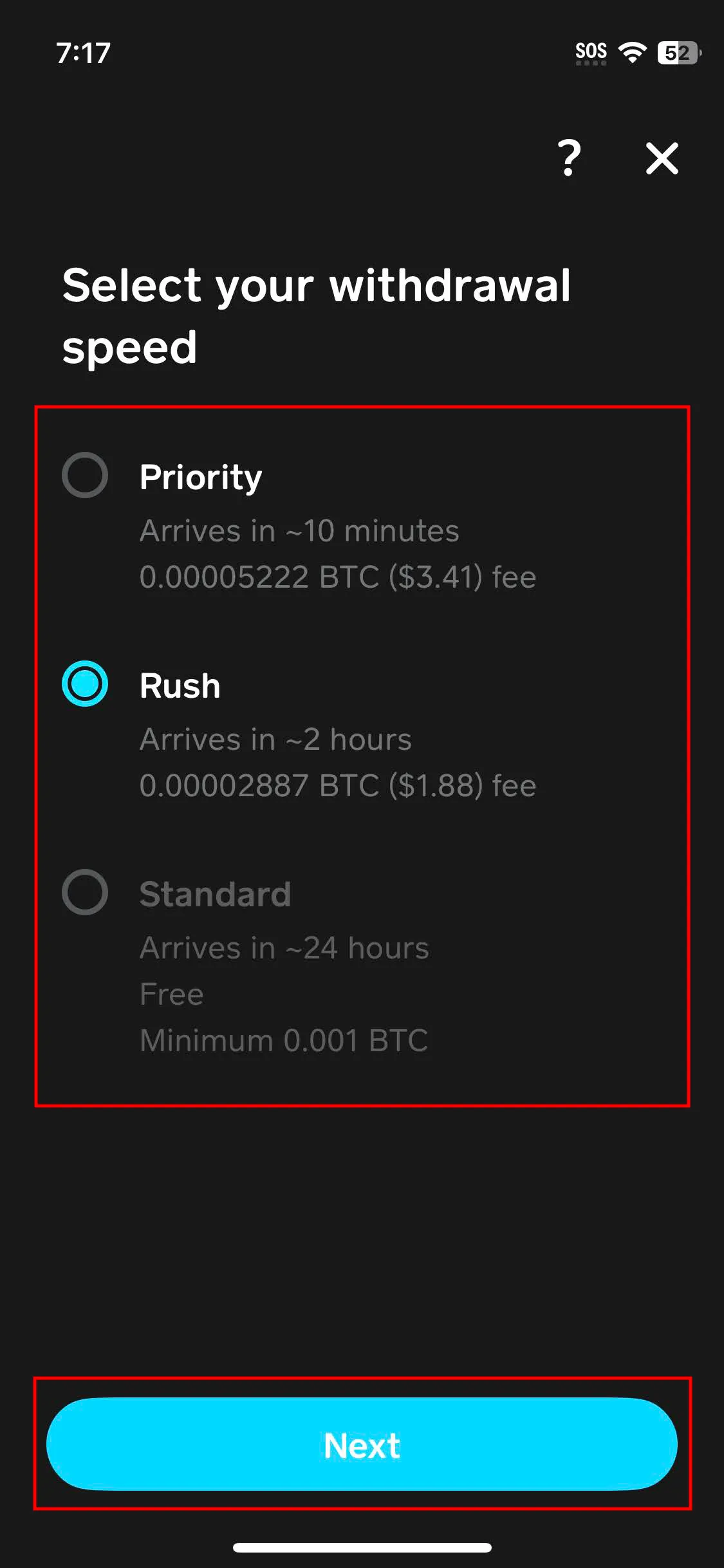
The above screenshot shows the Bitcoin withdrawal speed options in CashApp.